Stop Using Your EMR Software on Default Settings – Here’s How to Customize It for Your Practice
Most clinicians expect EMR software to save time. Yet many still stay late finishing notes, clicking through screens that feel slow and disconnected. The gap is frustrating.
What’s often missed is this: the system isn’t broken. It’s just running on default settings designed for a “typical” practice that doesn’t really exist.
That’s why even well-reviewed medical software can feel clunky in daily use. It hasn’t been shaped around how your team actually works. The workflows, templates, and alerts don’t reflect your patient mix or specialty.
Before diving in, it helps to understand What is EMR software. At its core, it’s a digital system for managing patient records, clinical workflows, and documentation in one place.
This guide isn’t about choosing a new system. It’s about getting more out of the one you already use. Whether you run a general clinic or rely on ophthalmology EMR software, customization is what turns software into a real clinical tool.
What Does Customizing EMR Software Mean?
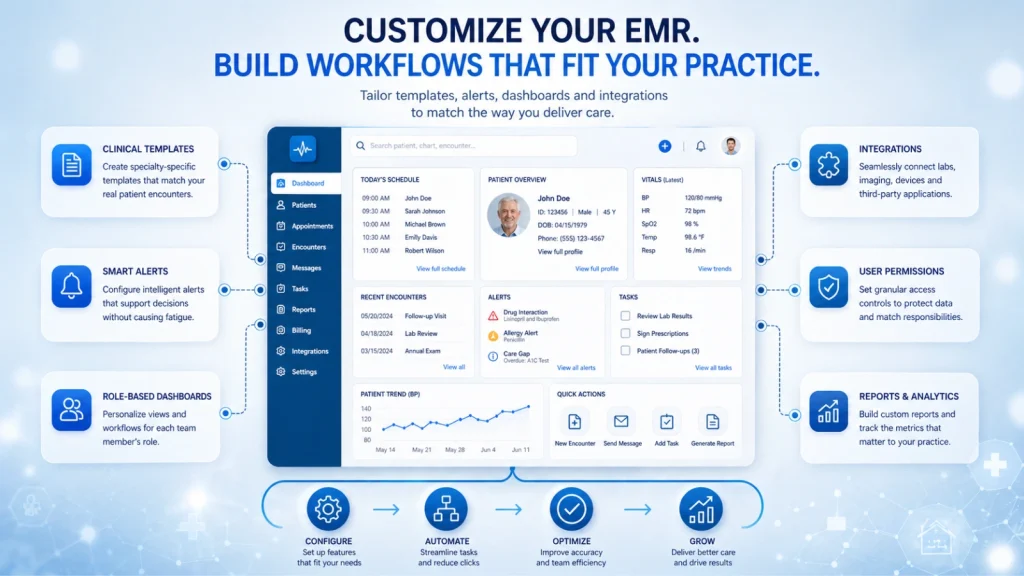
Customizing software means adjusting it to match how your practice actually operates. Instead of using generic defaults, you tailor templates, workflows, and system behavior to your needs.
The highest-impact areas include:
- Clinical templates aligned with real visit types
- Alerts that support decisions without overwhelming users
- Role-based dashboards for each team member
- Integrations with labs or diagnostic devices
- User permissions that match responsibilities
When done well, customization reduces clicks, improves accuracy, and gives time back to clinicians.
Why Generic EMR Settings Are Quietly Costing You Time and Revenue
Default configurations in EMR software are built for the average practice. The problem is, no practice is truly average.
That mismatch shows up quickly. Clinicians spend extra time navigating irrelevant fields or rewriting notes that templates should already support. Instead of helping, the system becomes something to work around.
Documentation is where the cost becomes obvious. Generic templates force providers to type more than necessary. Over time, those extra minutes per patient add up to hours lost each week.
Billing suffers too. When workflows aren’t customized, important codes or modifiers get missed. That leads to claim denials, delayed payments, and unnecessary rework.
Specialties feel this even more. Ophthalmology EMR software, for example, must capture detailed exam values, imaging data, and surgical history. Default setups rarely include these elements in a usable way.
So teams improvise. They add notes manually or store data in inconsistent places. That creates risk, slows care, and reduces the value of the system. Well-designed medical EMR software should make customization practical, not overwhelming.
The 7 Highest-Impact Ways to Customize Your EMR Software
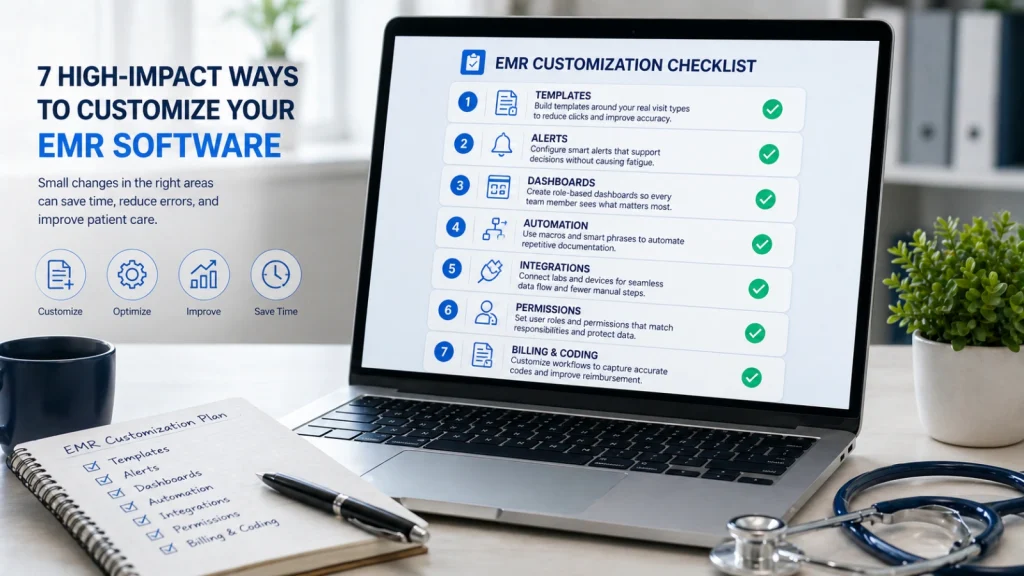
1. Rebuild Your Templates Around Your Actual Patient Encounters
Templates are the backbone of any EMR software setup. If they don’t reflect your real visits, everything else feels harder.
Start by reviewing your most common appointment types. These might include follow-ups, new consultations, or routine exams. Each one should have its own structured template.
A strong template reduces typing. It guides documentation in a logical flow and ensures nothing important gets missed.
For ophthalmology software, this becomes even more critical. Templates should include fields for visual acuity, intraocular pressure, refraction, and imaging results. Without these, clinicians end up entering data manually.
If you’re unsure where to begin, audit your last 20 patient notes. Look for repeated patterns. That’s your starting point.
2. Configure Clinical Decision Alerts That Actually Help
Alerts can improve care, but poorly configured ones do the opposite. Many EMR software systems trigger too many notifications, leading to alert fatigue.
When everything looks urgent, nothing truly stands out.
A better approach is to tier your alerts. Some should interrupt workflow because they signal real risk. Others can stay in the background.
For example, drug interaction alerts should reflect your patient population. Chronic disease reminders should align with your treatment protocols.
The goal is simple. Alerts should support decisions, not distract from them.
3. Set Up Role-Based Dashboards for Every Member of Your Team
Not everyone needs the same view of EMR software. A physician, receptionist, and billing specialist all work differently.
Role-based dashboards make that clear. They show only what each person needs, reducing clutter and confusion.
A front desk user might focus on schedules, check-ins, and payments. A clinician needs quick access to charts, labs, and pending notes.
When dashboards are tailored properly, workflows move faster. Handoffs between teams become smoother, and fewer steps are wasted searching for information.
4. Automate Your Most Repetitive Documentation
Every practice repeats certain phrases daily. Yet many teams still type them out manually inside their EMR software.
This is where macros or smart phrases come in.
Think about what you write multiple times a day. It could be post-op instructions, common diagnoses, or referral notes. These can be turned into shortcuts.
The impact is bigger than it seems. Saving even one minute per patient can reclaim a significant portion of your day.
Automation doesn’t replace clinical thinking. It simply removes unnecessary repetition.
5. Integrate Your Diagnostic Equipment and Tools
Many practices don’t realize how much their EMR software can connect with other systems.
Diagnostic devices, lab platforms, and imaging tools often support integration. When connected properly, data flows directly into patient charts.
This is especially important in ophthalmology software. Devices like OCT scanners or visual field analyzers generate detailed data. Entering that manually wastes time and increases error risk.
Integration reduces duplication. It also ensures consistency across records, which improves both care and documentation quality.
6. Customize Your Billing Workflows to Reduce Claim Denials
Billing accuracy depends heavily on how your EMR software is configured.
If workflows are generic, key steps may be skipped. Missing codes or incorrect modifiers often lead to denied claims.
Customization helps prevent this. You can set rules that flag incomplete entries before submission. You can also prioritize the codes your specialty uses most.
For ophthalmology practices, this is crucial. The coding structure is detailed and specific. Having the right options easily accessible reduces mistakes.
The result is faster reimbursement and less back-and-forth with payers.
7. Build a Patient Communication Workflow That Runs Itself
Patient communication doesn’t need to be manual. Most EMR software systems support automation, but it’s often underused.
Appointment reminders, follow-ups, and recall notices can all be scheduled automatically. The key is tailoring them to patient needs.
For instance, a glaucoma patient may need frequent follow-ups. A routine exam patient might only need annual reminders.
When communication is customized, engagement improves. At the same time, staff spend less time handling repetitive calls or messages.
Customization in Practice: What It Looks Like for an Ophthalmology Clinic
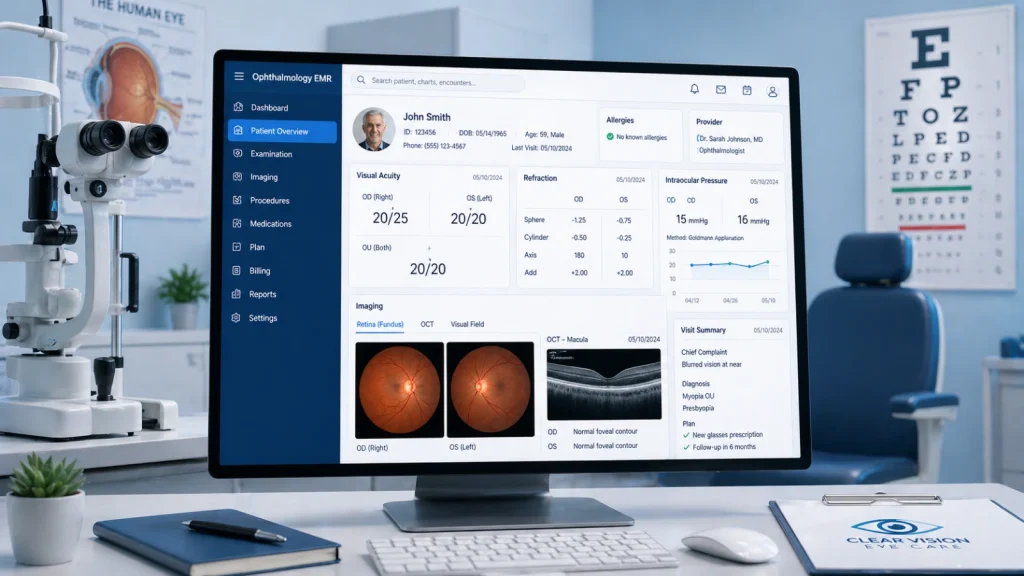
Consider a busy clinic using ophthalmology EMR software without customization. Staff manually enter test results. Physicians type detailed exam notes from scratch. Billing teams fix errors after submission.
The system works, but it slows everyone down.
Now imagine the same clinic after optimizing their software.
Diagnostic devices send data directly into charts. Templates guide documentation with specialty-specific fields. Billing workflows flag missing modifiers before claims go out.
Even patient communication improves. Follow-ups are scheduled automatically based on the condition.
The difference isn’t just efficiency. It’s consistency, accuracy, and reduced stress across the entire team.
The Customization Mistakes That Undermine the Whole System
Customization can go wrong if handled carelessly. Some practices over-automate their EMR software without reviewing results. That leads to outdated templates or incorrect messages being used repeatedly.
Others make changes without involving clinicians. When workflows don’t match real practice behavior, adoption suffers.
User permissions are another common issue. Giving everyone the same access creates clutter and potential security risks.
Perhaps the biggest mistake is treating customization as a one-time task. Practices evolve, and so should the system. Regular reviews keep everything aligned.
How Medcore Makes EMR Customization Work for Your Practice
Well-designed software should make customization practical, not overwhelming. That’s where Medcore focuses its approach.
Instead of forcing generic workflows, it supports specialty-specific configurations from the start. Templates are shaped by clinicians, not just IT teams.
Key capabilities include:
- Flexible templates designed for real clinical scenarios
- Role-based dashboards tailored to each team member
- Built-in tools for macros, automation, and documentation shortcuts
- Integration support for diagnostic equipment and external systems
- Billing workflows optimized for accuracy and faster claims processing
For ophthalmology EMR software users, Medcore supports:
- Structured fields for visual acuity and intraocular pressure
- Seamless integration with imaging devices
- Custom recall workflows based on eye conditions
The system adapts to your practice, rather than forcing your team to adapt to it.
The Future of EMR Customization: AI Is Changing the Game
Customization in software EMR is evolving quickly. AI is beginning to reduce the need for manual setup.
Instead of building templates from scratch, systems can learn from how clinicians document. Over time, they adjust automatically.
Coding is also becoming smarter. AI tools can suggest billing codes based on clinical notes, reducing manual work.
Alerts are improving as well. Systems can learn which notifications are ignored and adjust their importance accordingly.
For ophthalmology EMR software, AI is starting to integrate with imaging tools. Early systems can assist in detecting conditions and feeding results directly into records.
The direction is clear. Customization is shifting from manual configuration to adaptive systems that learn from real use.
Final Thoughts
If your EMR software feels slow or frustrating, the issue often isn’t the platform itself. It’s how it’s configured. The best EMR software isn’t just feature-rich. It’s the one that adapts to how your practice actually works.
Practices that invest in customization see real gains. They spend less time documenting, reduce billing errors, and improve overall workflow.
This isn’t a one-time fix. It’s an ongoing process that evolves with your practice.
A simple place to start? Review your templates or alerts this week. Even small changes can make a noticeable difference.
Frequently Asked Questions
How long does it take to customize an EMR system?
Most software setups take a few weeks for initial configuration. Full optimization usually happens over several months with ongoing adjustments.
Can I customize my EMR without vendor support?
Many features, like templates, macros, and dashboards, can be adjusted independently. More advanced changes, such as integrations, often require vendor involvement.
What’s the difference between EMR and EHR customization?
Both involve tailoring workflows, but EMR software typically focuses on a single practice. EHR systems often include broader data sharing across organizations.
Is ophthalmology EMR software harder to customize?
Yes. It involves more detailed data, imaging, and surgical documentation. That complexity requires deeper customization to work effectively.
How do I know if I should customize or switch systems?
Ask three questions. Can your current EMR software support your needs? Is your vendor responsive? Is the system designed for your specialty?
If the answer is no to most of these, it may be time to consider alternatives.